Resource slug template
Waldur lets service providers configure how resource slugs are generated, per offering. This is useful when a backend derives identifiers from the slug and the default, shortened slug is too restrictive.
How resource slugs work
Every resource receives a unique slug (identifier) when it is created. By default the slug is the slugified resource name, truncated to 10 characters (for example, a resource named Machine Learning Cluster becomes machine-le).
Some backends build their own object names from this slug. For example, the SLURM site agent forms the SLURM account name as <prefix><resource-slug>, so the 10-character default limits how descriptive those account names can be.
Two per-offering options let you lift this limit:
- Resource slug maximum length — keep the default, name-based slug but allow more characters (the simplest option).
- Resource slug template — build a fully custom, structured slug from organization, project, and offering identifiers.
Both are set under Edit → Integration → Operations → Provisioning.
Increasing the slug length
Performed by: Service provider (offering owner)
Set Resource slug maximum length to the number of characters you want (up to 40). The slug is still derived from the resource name, just truncated at the configured length instead of 10.
For example, with a maximum length of 30, a resource named Machine Learning Cluster becomes machine-learning-cluster instead of machine-le.
Note
Leave this empty to keep the 10-character default. It is ignored when a Resource slug template is set.
Configuring the template
Performed by: Service provider (offering owner)
- Open the offering and select Edit → Integration.
- Open the Operations card and switch to the Provisioning tab.
- Set the Resource slug template using the variables below.
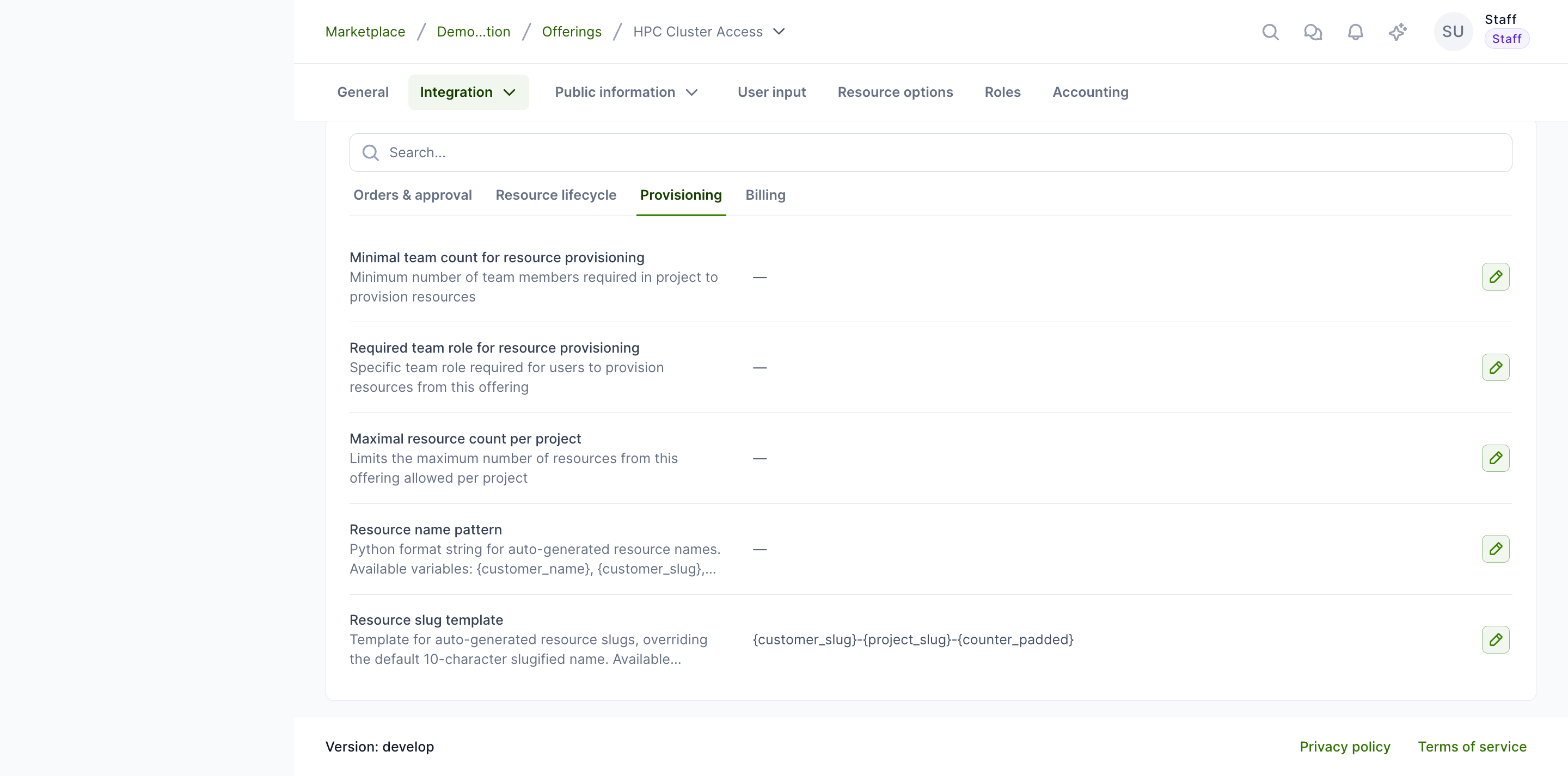
When the template is left empty, Waldur keeps the default behaviour (slugified name, 10 characters).
Available template variables
| Variable | Description | Example value |
|---|---|---|
{customer_slug} |
Organization slug | demo-organ |
{project_slug} |
Project slug | demo-proje |
{project_name} |
Slugified project name | demo-project |
{offering_slug} |
Offering slug | basic-vm |
{year} |
Current year | 2026 |
{month} |
Current month (2-digit) | 06 |
{counter} |
Sequential counter for the project and offering | 7 |
{counter_padded} |
Zero-padded counter (3 digits) | 007 |
Example patterns
| Pattern | Example output |
|---|---|
{customer_slug}-{project_slug}-{counter_padded} |
demo-organ-demo-proje-001 |
{offering_slug}-{year}{month} |
basic-vm-202606 |
{project_slug}-{counter} |
demo-proje-7 |
Note
The default pattern (if no template is configured) is the slugified resource name, limited to 10 characters.
Who may set a slug by hand
A generated slug is not the only way to name a resource or a project: a caller can pass a slug when creating an order or a project, or change one afterwards. Two permissions govern that, and neither is granted to any role out of the box — by default only staff may set a slug.
| Permission | Checked on | What it allows |
|---|---|---|
RESOURCE.SET_SLUG |
the resource's project or organization, its offering, and the offering's organization or service provider | POST /api/marketplace-resources/{uuid}/set_slug/ (and the provider-resources twin); slug on order create |
PROJECT.SET_SLUG |
the project or its organization | POST /api/projects/{uuid}/set_slug/; slug on project create |
A deployment that wants others to name its allocations grants the permissions to the roles it chooses in permissions-override.yaml:
1 2 3 4 5 6 | |
initdb re-applies the override on every deploy. Do not grant the permissions through the role editor in the UI instead: import_roles resets the system roles to permissions.yaml on the next deploy and the grant disappears.
Without the permission, a slug sent on create is ignored — even a malformed one — and the slug template applies as usual. A holder cannot change a slug once a backend account may exist or is being created:
- a resource locks once it has a backend identifier, or once its creation order is executing, done or erred. While the order still awaits approval or its start date, the slug can change.
- a project locks once any of its non-terminated resources is locked.
The check and the save run under a row lock, so an order cannot start executing in between. Slugs must be unique per model, and every change is recorded in the event log with the old and new slug and the caller.
Important considerations
- The template applies only to newly created resources. Existing resource slugs are never regenerated.
- The rendered value is slugified (lowercase, hyphen-separated) so it stays safe for backends such as SLURM.
- Keep the rendered slug within 40 characters — Waldur rejects templates whose output would be longer, leaving room for a uniqueness suffix.
- If two resources would produce the same slug, Waldur appends a numeric suffix (
-2,-3, …) to keep slugs unique. - If the template contains an unknown variable or cannot be rendered, Waldur logs a warning and falls back to the default slug.