Managing POSIX ID pools
Linux and HPC offerings provision local accounts and groups for their users — for example through GLAuth (LDAP) and the Waldur site agent that feeds SLURM clusters. Each such account needs a numeric POSIX UID (user id) and GID (group id). A POSIX ID pool lets a service provider reserve the number blocks Waldur allocates from, so that user and group identifiers stay unique and predictable across all of the provider's offerings.
Note
POSIX ID pools are how Waldur allocates UIDs and GIDs — an offering only
hands out identifiers when a pool resolves for it. If you do not see the
POSIX ID pools entry in the Accounts menu of your provider
workspace, ask the platform operator to make it visible (the
marketplace.show_posix_id_pools feature flag).
How a pool works
A pool holds two independent number ranges — one for UIDs and one for GIDs — each defined by a minimum and a maximum. UIDs and GIDs are separate namespaces, so a UID and a GID may share the same number, but no two accounts ever share a UID, and no two groups ever share a GID.
A pool must define at least one of the two ranges, but either may be left
empty to source that identifier externally instead of from the pool. The
common case is a federated deployment where each user's UID is a property of
their identity (delivered as an OIDC/SAML uidNumber claim and the same on every
site), while project and role GIDs are allocated per provider by Waldur: give
such an offering a GID-only pool (leave the UID range empty) and set its
UID source to the user attribute (see
GLAuth user accounts → sourcing UID/GID).
Pairing a GID-only pool with externally-sourced UIDs guarantees a Waldur-allocated
UID can never collide with the identity provider's.
A pool is attached to one of two scopes:
| Scope | Use it when… |
|---|---|
| Service provider (default) | One identifier space shared by all of your offerings. Most providers need only this. |
| Offering (override) | A single offering needs its own isolated number space — for example a separate cluster with its own LDAP directory. |
The identifiers a pool hands out reach a directory either through GLAuth or, for a provider running its own OpenLDAP, through the site agent writing them into that tree.
When Waldur needs an identifier for an offering, it uses the offering's own pool if one is defined, otherwise the service-provider pool. If neither resolves, the affected accounts are left without a UID/GID and are excluded from the GLAuth output until a pool is configured.
Creating a pool
-
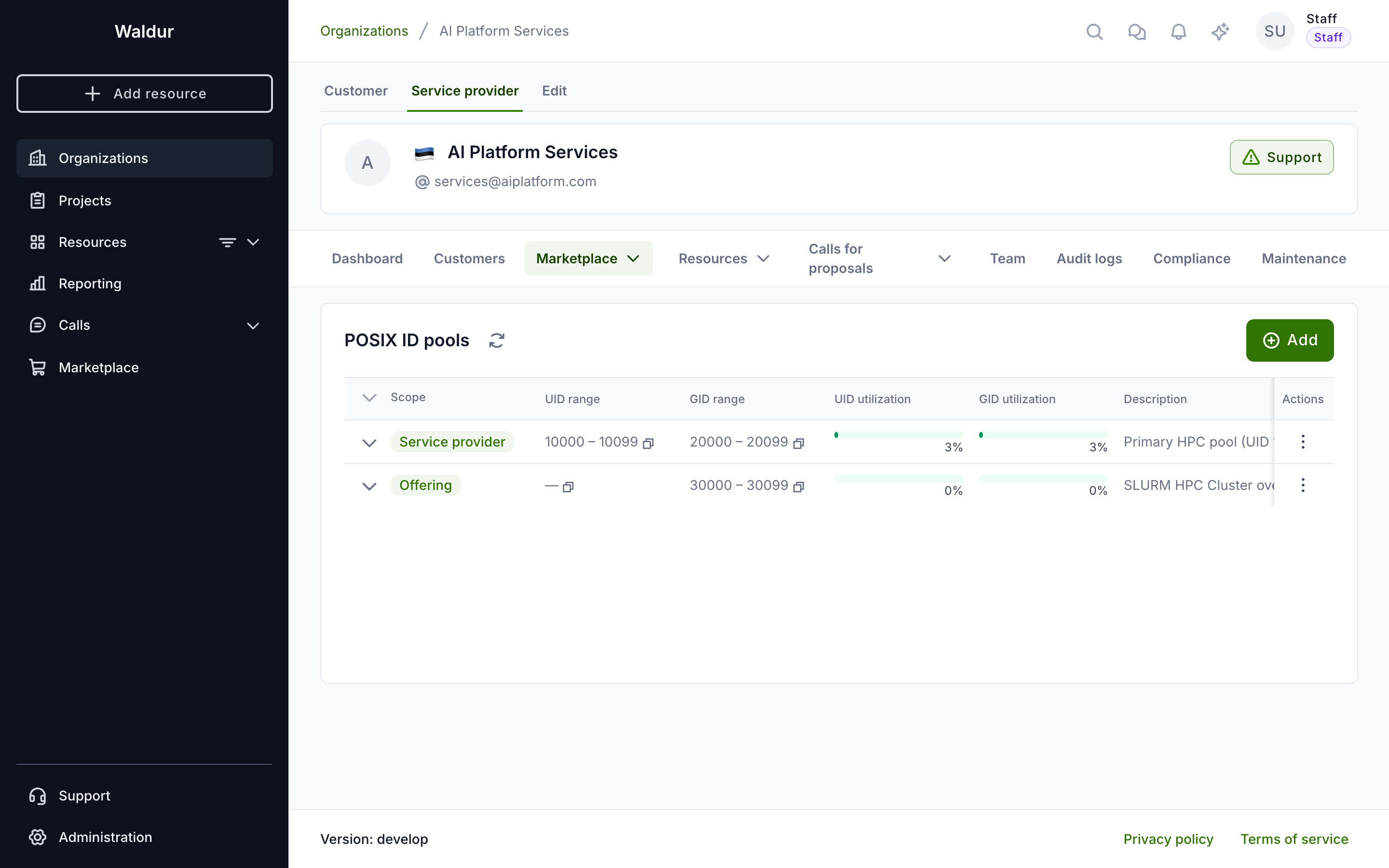
Open your provider workspace, go to Accounts → POSIX ID pools and click Add.
-
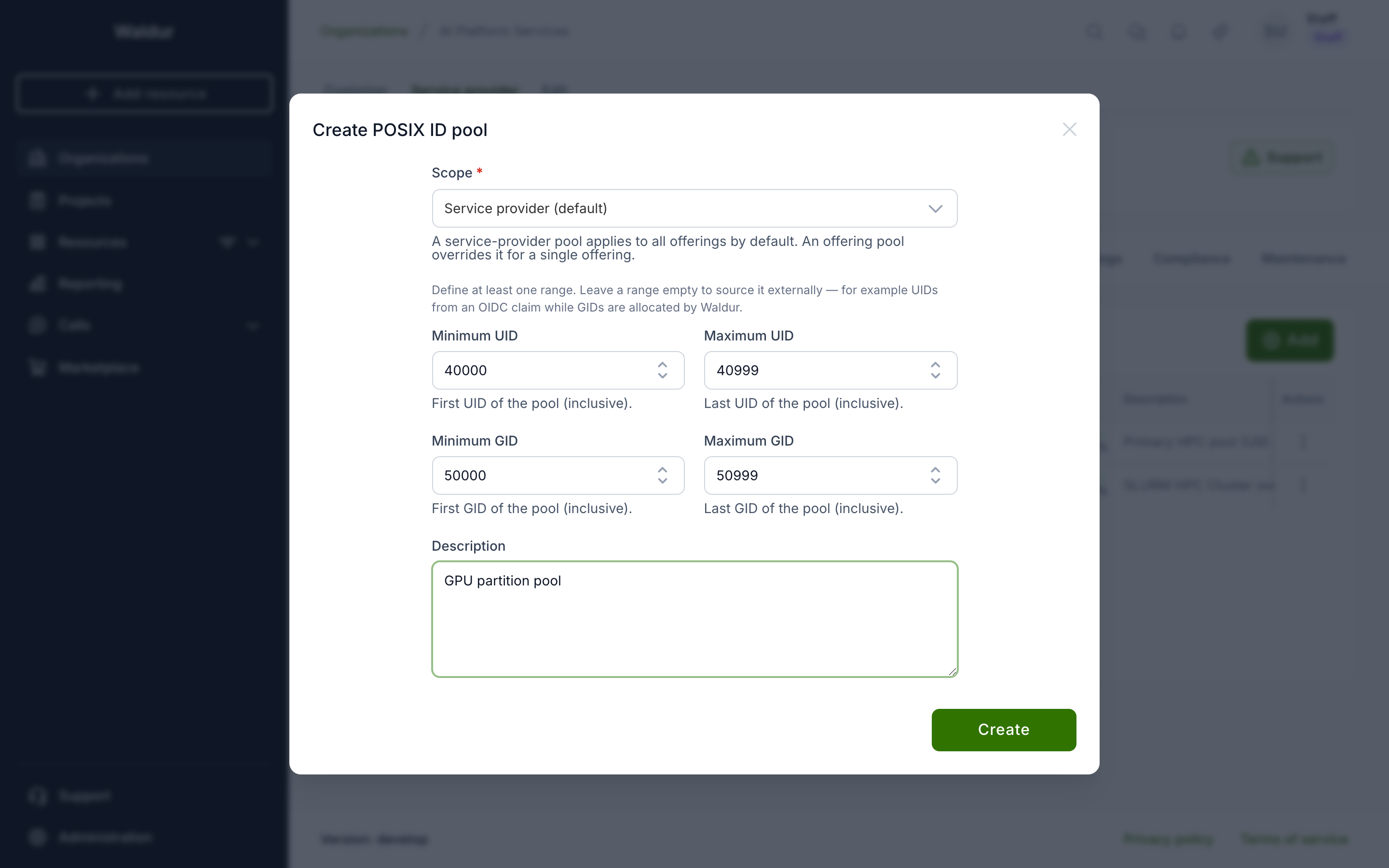
Choose the Scope. Keep Service provider (default) for a provider-wide pool, or pick Offering (override) and select the offering for an isolated per-offering pool.
-
Enter the Minimum and Maximum for the UID and/or the GID range (all inclusive). Define at least one range; leave a range empty only when that identifier is sourced externally (see the note above). Each range is all-or-nothing — set both its bounds or neither. Optionally add a description, and click Create.
Pools of one provider may not overlap within a namespace
Across a provider's pools, UID ranges must not overlap each other and GID
ranges must not overlap each other — one provider is treated as one POSIX
identifier space per namespace. A UID range may share numbers with a GID
range (the two namespaces are independent). If you try to save an
overlapping pool, Waldur rejects it and names the conflicting pool, so an
offering override must use a number band disjoint from the provider default
(for example provider UIDs 100000–199999, an isolated offering's UIDs
300000–399999).
Project group GIDs
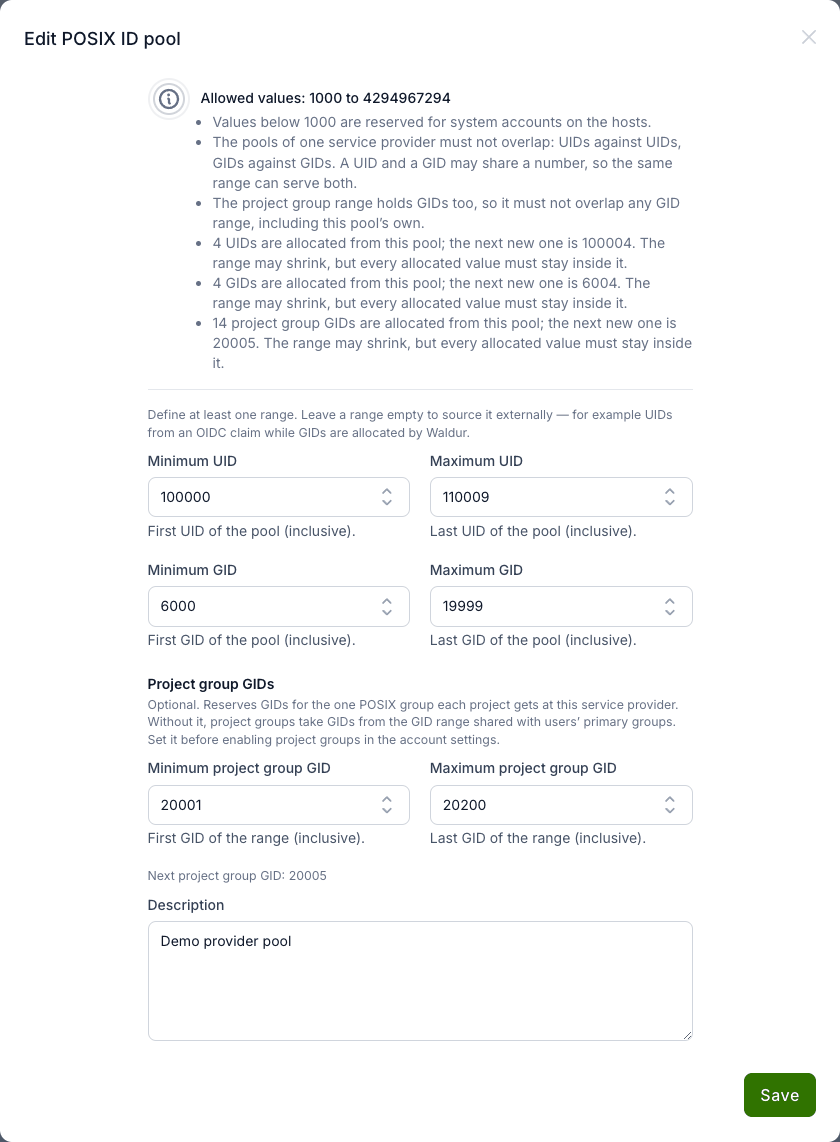
A service-provider pool can reserve a third range, for project groups — the one POSIX group each project gets at your service provider. Set it in the pool form under Project group GIDs (Minimum project group GID and Maximum project group GID, both inclusive; set both or neither). The form shows the next GID the range will hand out.
- Set it before enabling project groups. Without a project group range, groups take their GIDs from the pool's GID range, which they then share with users' primary groups. See rolling out project groups.
- It must not overlap any GID range. The range holds GIDs too, so it may not overlap the pool's own GID range, nor the GID or project group range of any other pool of the provider. Waldur rejects an overlapping pool and names the conflict.
- Only the service-provider pool is used. A project group belongs to the whole provider, so its GID always comes from the provider-level pool; offering-override pools are never consulted. If the provider has only offering-override pools, groups are created without a GID and get one as soon as a provider pool can supply it.
- Adding or widening the range catches up. Groups still waiting for a GID get one when the pool is created, and whenever its project group or GID range is added or widened.
A pool cannot be deleted while project groups hold GIDs from it, and a newly created provider pool reserves the GIDs the provider's groups already carry, so they are never handed out again.
Which pool applies to an offering
Resolution is simple: an offering uses its own pool if it has one, otherwise the service-provider pool. To check, open the offering and go to Edit → Integration → User management — the panel shows the pool in effect for that offering, with a link to manage the provider's pools.
Monitoring utilisation
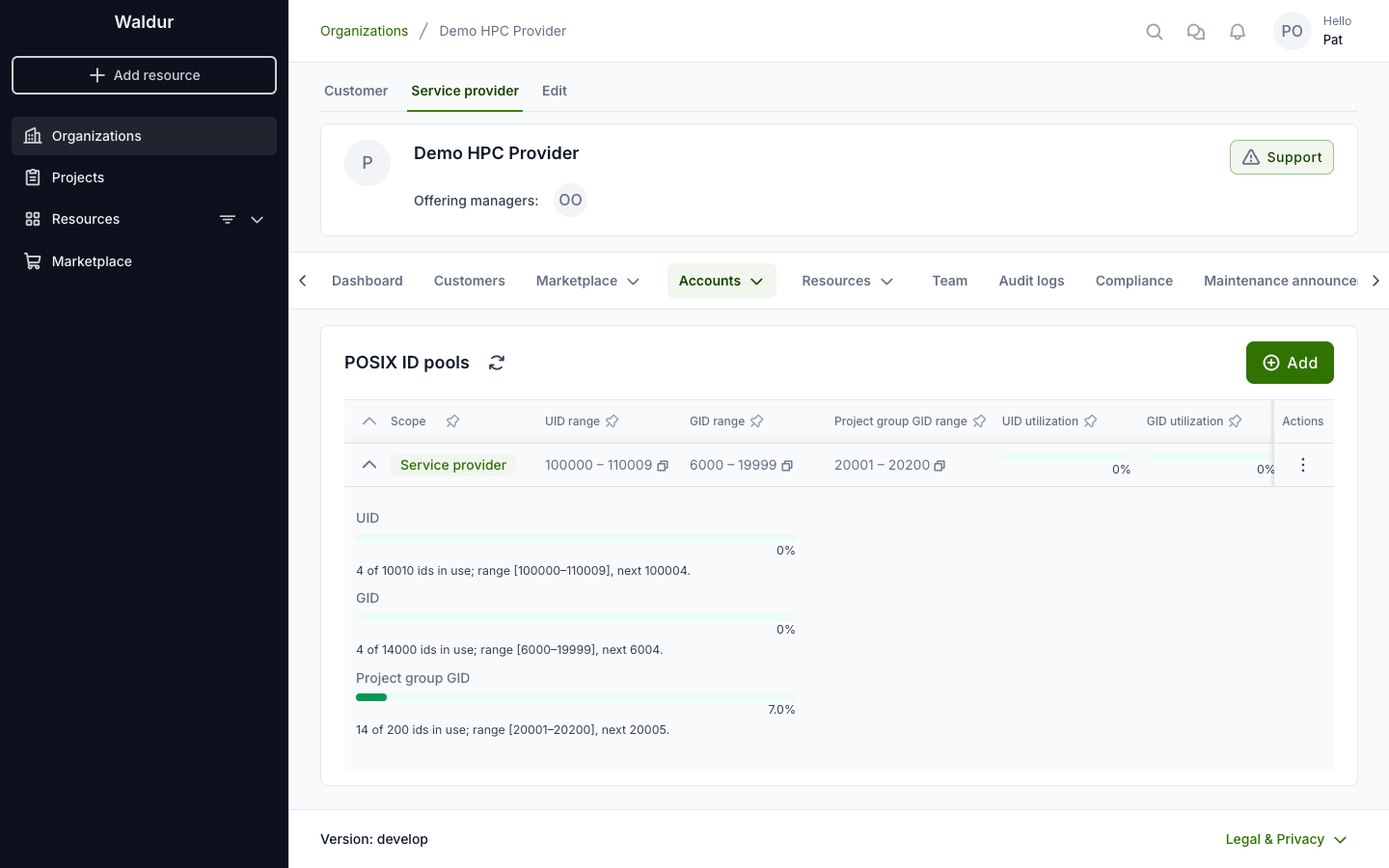
The pools list shows the UID and GID utilisation of every pool at a glance. Expand a pool row for the full per-namespace breakdown — capacity, the number of identifiers in use, and the next value the allocator will hand out for each namespace. A namespace that the pool does not manage (an empty range) is shown as Not managed by this pool — sourced externally rather than a utilisation bar.
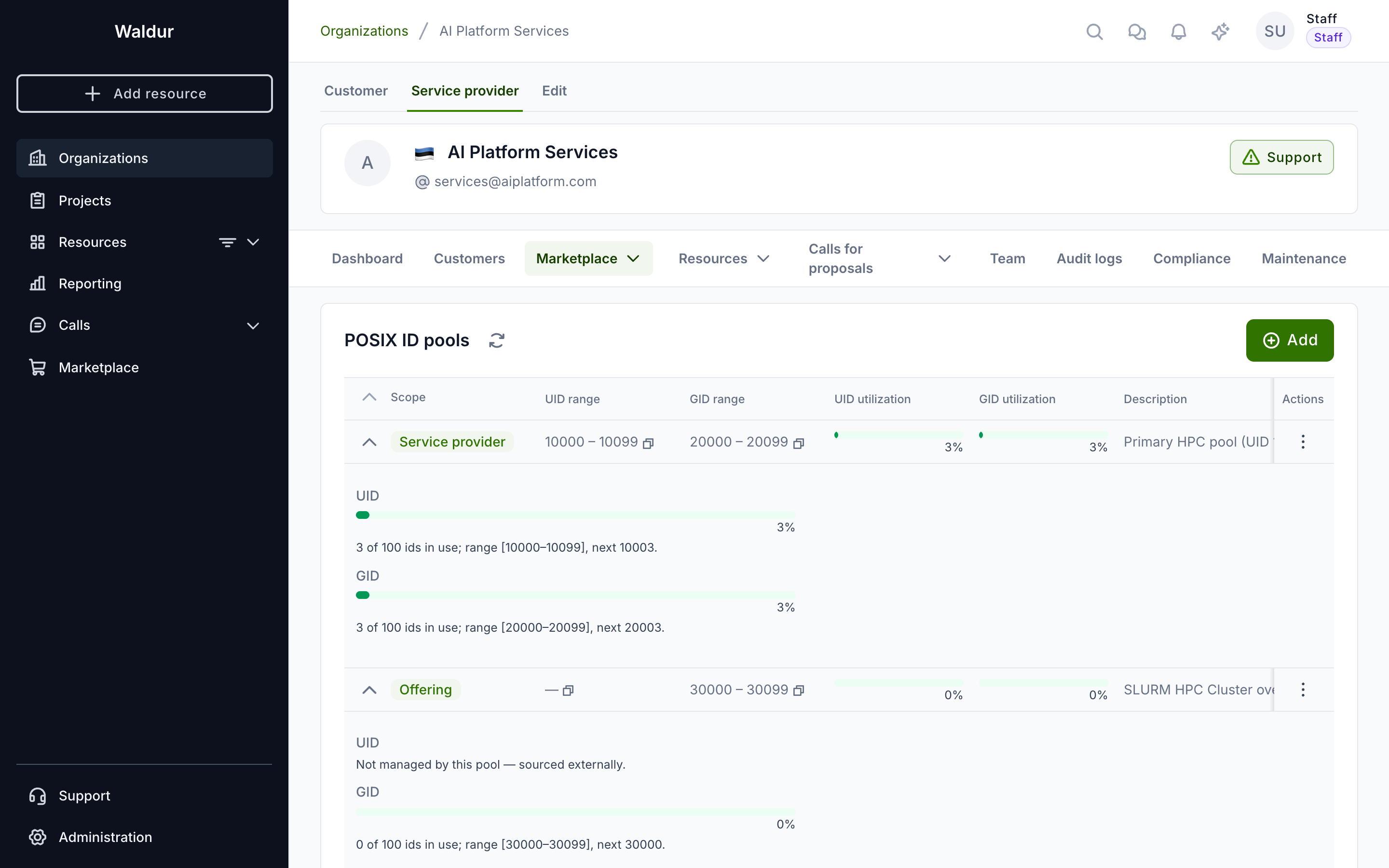
The utilisation bar turns amber as a namespace fills and red once it crosses the threshold (90% by default), so you can widen the range before it runs out. An exhausted namespace stops account creation with a clear error until more numbers are available.
A pool with a project group range shows it in the Project group GID range column, and the expanded row adds a Project group GID bar with the same threshold. A GID counts against the range it lies in.
How identifiers are assigned
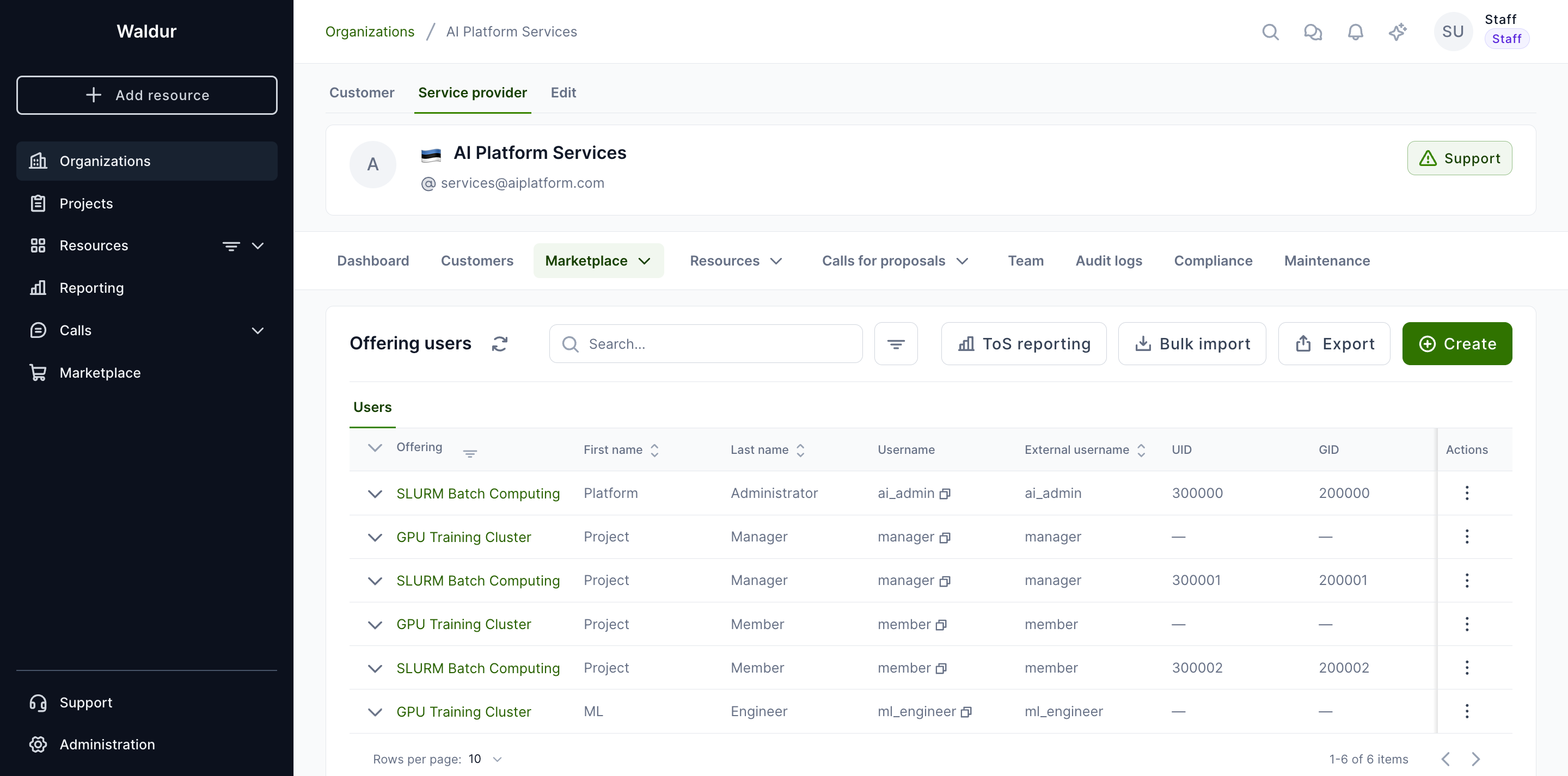
Identifiers are handed out sequentially from the resolved pool as offering users, robot accounts and groups are created — a high-water mark advances per namespace. The assigned values are stored on each account, so you can review the UID and GID on the provider's Accounts → Users page, on its Offering users tab.
Usernames derived from the pool
A UID is not only a number the directory stores — with the anonymized
username generation policy it also names the account. An anonymized username
is the configured prefix followed by the account's pool UID, so the user whose
UID is 9001 logs in as hpc_9001 (with a prefix of hpc_; the default is
waldur_). The prefix is set once on the service provider's Account settings page
(Anonymized username prefix) or per offering (username_anonymized_prefix),
and the offering's value wins when both are set — the same rule that picks the
pool.
Deriving the name from the UID is what makes it stable. A counter scoped to one offering and a UID scoped to the provider disagree as soon as two offerings share a directory: the same person would get two names for one UID, and two people could get one name. Because the pool is provider-wide, every offering that draws from it computes the same name for the same person, so the username is unique wherever the UID is unique, does not change when the person joins a second offering, and regenerating it is a no-op. That is the property a shared LDAP directory needs — see Waldur-authoritative accounts in OpenLDAP.
When no UID resolves for a user — no pool attached, or POSIX accounts disabled on the offering — Waldur falls back to a per-offering counter and logs it. A counter name is not shared across offerings, so attach the pool before the first users are created.
When an offering user or group is deleted, its identifiers are released and recycled automatically: the next account created from the same pool reuses the lowest released value before the high-water mark advances further. Released records are kept as an audit trail and are visible in a pool's identities view. Project group GIDs are the exception: a GID a project group gave up is never handed out again automatically, because files on shared storage may still carry it.
Where an identifier came from
Expanding an offering user shows a POSIX identifiers table listing each of that account's identifiers together with the pool scope it was allocated from. Some rows show a dash instead of a scope. That is not an error: it means the value is not tracked by any pool.
A value ends up untracked in one of three ways:
- It is sourced from a user attribute. When the offering's
uid_sourceorgid_sourceis set touser_attribute, the identifier is taken from the Waldur user's ownuid_number/primary_gid— typically populated from an identity-provider claim — rather than allocated. No pool is involved, so a dash is the expected display. See sourcing UID and GID. - It predates POSIX ID pools and was not picked up when the deployment was upgraded.
- It was seeded directly, for example by a structure import or straight into the database.
Untracked values are not reserved
An identifier the allocator does not know about is outside its bookkeeping, so nothing prevents the same number later being handed to another account from a pool whose range covers it. Where that matters, bring the value under a pool — see legacy identifiers below.
Upgrading an existing deployment does not, by itself, leave values untracked. The migration that introduces pools synthesises one pool per offering with its bounds widened to cover every identifier already in use, and records each of those identifiers, so values that existed at upgrade time end up inside a pool.
Pinning specific UIDs/GIDs
Sometimes an account must keep a specific UID or GID — for example to match an identity that already exists on the backend. Set it from Edit POSIX attributes on the offering user (see Per-user overrides). The value must fall within the offering's pool and must not already be in use; the allocator then skips it when handing out sequential numbers, so a pinned value never collides with an automatically assigned one.
Note
Valid POSIX ids run from 1000 (below is reserved for system accounts) to
4294967294. If an offering needs a number band entirely separate from the
provider default — for instance a block reserved for manually pinned
identities — give that offering its own offering-override pool rather
than pinning outside the provider pool's range.
A pinned value must be inside the pool that applies to the offering. Waldur rejects a value outside that range, and rejects one already held by another active account, rather than accepting it and letting two accounts collide later. So "pin an arbitrary number" is not available by design — if the number you need falls outside every configured range, widen or add a pool first, as described next.
Legacy identifiers outside a pool
Sites migrating onto Waldur often arrive with UIDs and GIDs already in use on the backend, in bands that no configured pool covers. There are two supported ways to accommodate them; which one fits depends on whether the identifier belongs to the site or to the identity.
The identifiers belong to this site
Give the offering its own offering-override pool whose range covers the legacy band, then pin the individual values inside it (see Pinning specific UIDs/GIDs).
This keeps every legacy value under the allocator's bookkeeping, so it is
reserved and can never be reissued. Remember that pools of one provider must not
overlap within a namespace, so the override band has to be disjoint from the
provider default — for example a provider default of 100000–199999 alongside a
legacy offering on 5000–9999.
The identifiers belong to the user's identity
If a user's UID is a property of who they are rather than of this site — the
same on every site in a federation, delivered as an OIDC or SAML uidNumber
claim — do not try to reproduce it from a pool. Set the offering's uid_source
to user_attribute and pair it with a GID-only pool, as described under
sourcing UID and GID. Waldur then
never allocates a UID at all for that offering, so it cannot collide with the
one the identity provider supplies, while project and role GIDs continue to come
from the pool.
Both sources are set on the offering, on the POSIX tab of Edit → Integration → User management:
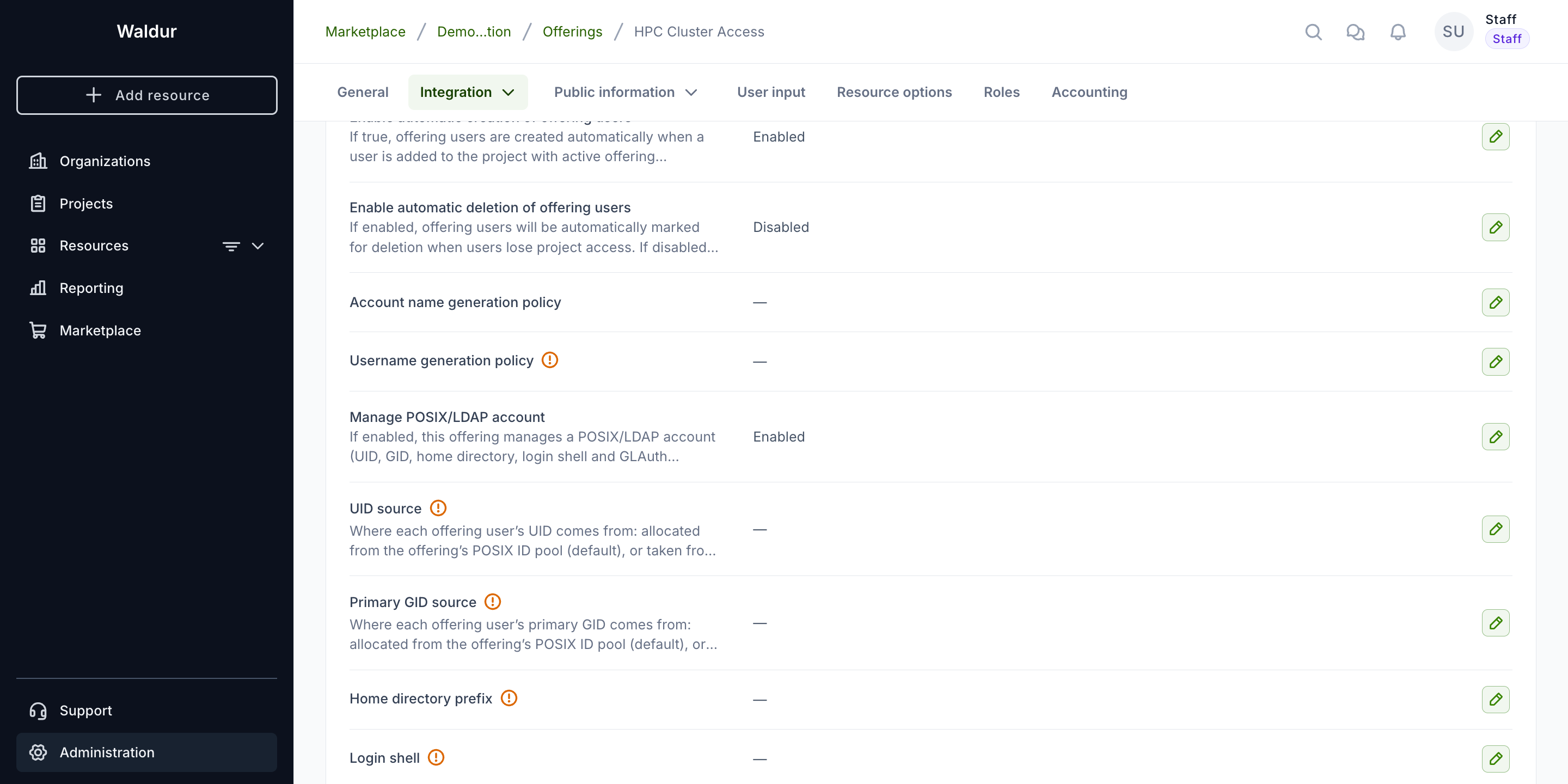
The trade-off between the two: an override pool keeps everything visible in one place and reserved against reuse, but the numbers are this site's to manage. User attributes keep a user's UID stable across sites, at the cost of those UIDs not appearing in any pool's utilisation figures — they will show a dash for pool scope, as described in where an identifier came from.