Shared project storage with GLAuth and SSSD
Waldur assigns each offering user a POSIX UID and primary GID and each
project (and resource role) a shared GID, then exposes them — together with
group membership — through a GLAuth (LDAP) directory.
A Linux backend such as an HPC login node consumes that directory with
SSSD so that ordinary POSIX tooling (getent, id, file
ownership) resolves Waldur identities. This page shows how to connect such a host
and use the project GIDs to own shared project folders with the correct group
permissions.
Already running OpenLDAP?
This page covers the GLAuth path, where Waldur renders the directory. If the provider already operates an OpenLDAP tree, the site agent can write Waldur's accounts into it instead -- see Waldur-authoritative accounts in OpenLDAP. That path needs none of the attribute-mapping overrides below, but does not yet publish SSH keys, so key-based SSH login remains a GLAuth capability for now.
How the pieces fit together
Identities flow one way — from Waldur, through GLAuth, to the login node — and
POSIX tooling and sshd consume them there:
flowchart LR
  subgraph Waldur
    A["Offering users<br/>(UID/GID, home, shell)"]
    K["User SSH keys"]
    G["Project / role GIDs<br/>+ group membership"]
  end
  A --> R
  K --> R
  G --> R
  R["GLAuth config refresher<br/>(glauth_users_config / glauth_tree API)"] --> L[("GLAuth<br/>LDAP :3893")]
  L -->|LDAP| S["SSSD<br/>on the login node"]
  S --> N["nss_sss<br/>getent / id"]
  S --> SK["sss_ssh_authorizedkeys"]
  SK -->|AuthorizedKeysCommand| D[sshd]
  D --> U((User logs in<br/>with their SSH key))
  N --> F["Shared project folders<br/>owned by the project GID"]
Note that the login name a user types is the GLAuth cn (the generated POSIX
login name), and their SSH keys reach sshd as GLAuth's sshPublicKey attribute
— both details drive the SSSD settings below.
Connecting an SSSD client to GLAuth
Point SSSD at the GLAuth server as an LDAP identity provider. GLAuth serves users
as posixAccount entries named by cn and groups as posixGroup entries named
by ou, carrying memberUid, so three attribute-mapping settings differ from
the SSSD defaults:
1 2 3 4 5 6 7 8 9 10 11 12 13 14 15 16 17 18 19 20 21 | |
Use cn, not preferredUsername
The login name must be ldap_user_name = cn. GLAuth cannot filter searches
on custom attributes, so ldap_user_name = preferredUsername matches no one
— getent returns nothing and key-based SSH login fails. cn already holds
the generated login name.
Add sss to the passwd, group and shadow databases in
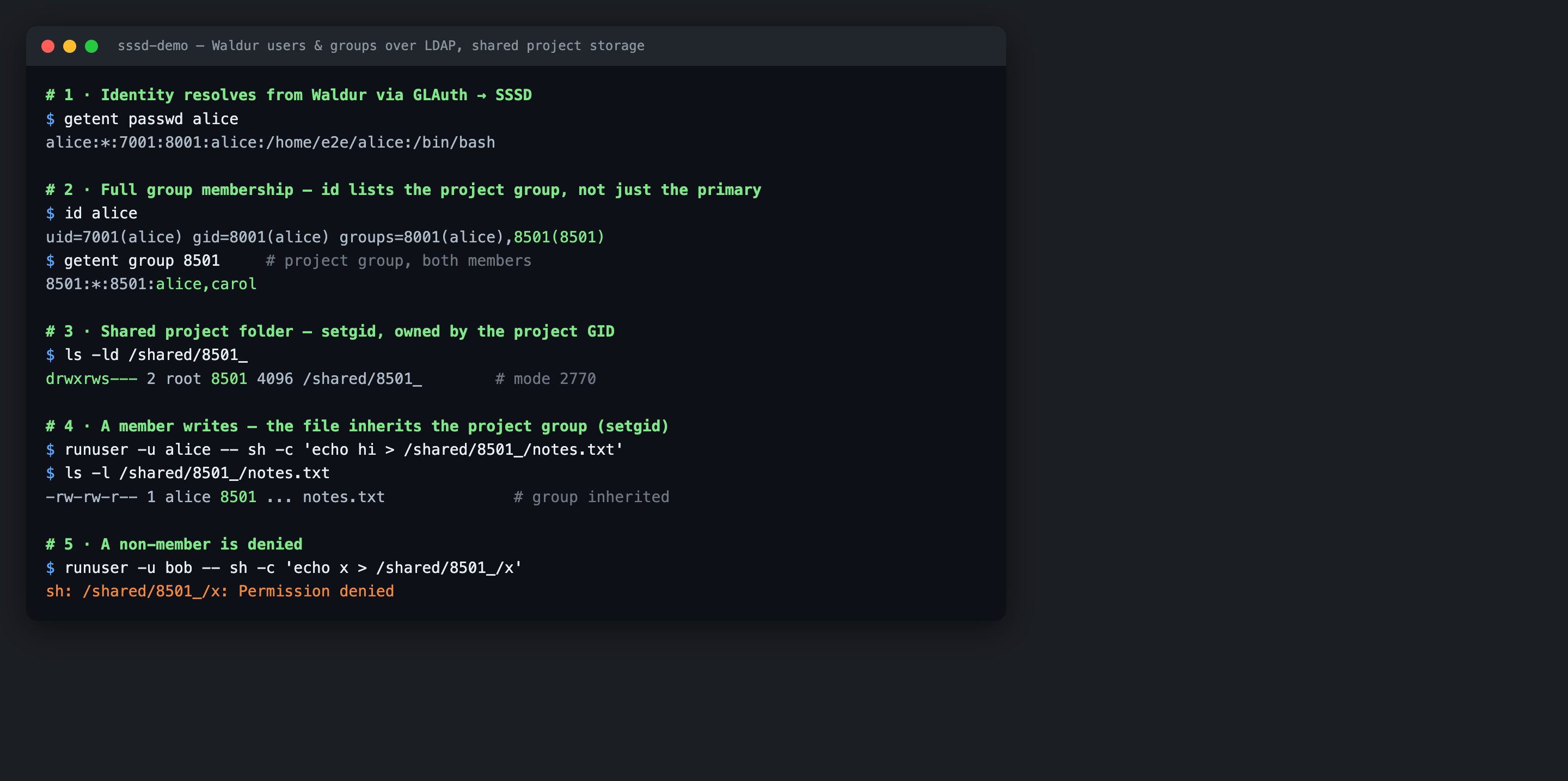
/etc/nsswitch.conf and start SSSD. Users and their full group membership
now resolve — id lists a user's project groups, not just their primary group:
Why rfc2307
GLAuth's own documentation warns that SSSD "does not properly list users
belonging to a given group" under rfc2307bis. Use rfc2307 (which resolves
membership via memberUid) so that id <user> returns the project groups
and group-based file permissions work.
SSH key login
Each Waldur user's SSH public keys are exported as GLAuth's sshPublicKey
attribute. With the ssh responder enabled above, sss_ssh_authorizedkeys
returns them, so sshd can authorise key-based logins straight from the
directory — no per-user authorized_keys file on the node:
1 2 | |
Point sshd at that command with a drop-in under /etc/ssh/sshd_config.d/:
1 2 3 | |
Reload sshd. A user can now ssh <login-name>@<node> with the private key
matching any SSH key on their Waldur account.
Shared project folders
Because every project has a stable, provider-unique GID, a shared directory owned by that GID — with the setgid bit — becomes a project folder that only its members can write to, and every file created inside inherits the project group:
1 2 3 4 | |
A project member can then write to the folder and their files stay group-owned by
the project; a non-member is denied (see the screenshot above). Drive this from
the glauth_tree export (the authoritative list of
project/role groups and their GIDs) so folders appear automatically as projects
are created.
Troubleshooting
When users do not resolve or cannot log in, work outwards from GLAuth. The commands and output below were captured against a live GLAuth + SSSD pair.
1. Is GLAuth reachable and serving accounts? Bind as the service account and list users. A failure here is a GLAuth, bind-DN or password problem — not SSSD:
1 2 3 4 5 6 | |
2. Does a specific user carry the expected attributes, including its key?
1 2 3 4 5 6 7 8 9 10 | |
3. Does SSSD resolve the user and their keys?
1 2 3 4 5 6 7 8 | |
If steps 1–2 succeed but these return nothing, SSSD is misconfigured — most
often ldap_user_name is not cn, ldap_schema is rfc2307bis, or the cache
is stale.
4. Inspect SSSD directly, then force a fresh lookup after changing config or Waldur data:
1 2 3 4 5 6 7 8 9 10 11 12 13 | |
Cleaning up orphaned folders
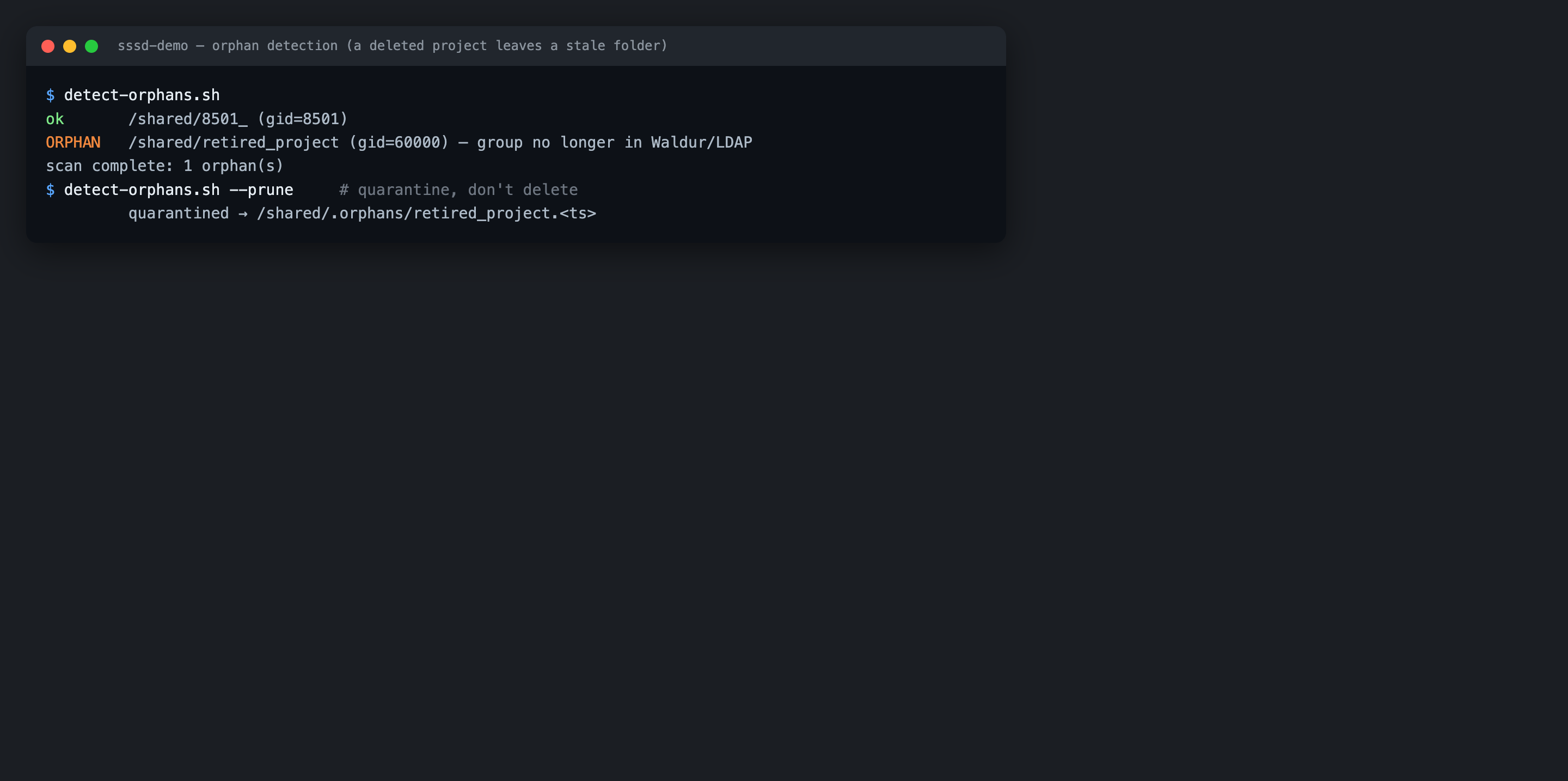
When a project or resource is deleted its group disappears from Waldur and from
the directory, but any shared folder it owned remains on disk, owned by a GID
nobody can be a member of any more. Reconcile the folders against the current
glauth_tree (and getent group) periodically: a folder whose GID is gone from
Waldur and no longer resolvable over LDAP is an orphan and can be
archived or removed.
Warning
Treat a folder as an orphan only when the group is authoritatively gone from Waldur — not merely unresolved. If the directory or API is temporarily unreachable, quarantine (move aside) rather than delete, so a transient outage never destroys live project data.
Reference implementation
A complete, runnable example of this pipeline — a GLAuth server fed by Waldur, an
SSSD client container, automatic shared-folder provisioning and an orphan
detector — lives in the
glauth-sssd-demo
directory of the integration-testing repository.