SRAM (SURF Research Access Management)
SRAM manages research collaborations (COs): an organisation creates a CO, invites members, groups them, and connects the CO to services. For every service with SCIM enabled, SRAM's application (SBS) pushes the members and groups of the connected COs to that service's SCIM 2.0 endpoint.
This page describes how to connect Waldur to SRAM as such a service, and how to run SBS locally next to a Waldur development stack to work on the integration.
Requirements
The SRAM integration (/scim/v2/sram/, organization mapping, placeholder
roles and project rules) requires Waldur 8.1.3 or later; release candidates
up to 8.1.3-rc.14 do not include it. Older releases only accept users on
the generic /scim/v2/ endpoint, and a sweep against that endpoint deletes
everything SRAM does not know, so never connect SRAM to them with the sweep
enabled (see The sweep).
How SRAM talks to a service
sequenceDiagram
    participant SBS as SRAM (SBS)
    participant W as Waldur /scim/v2/sram
    Note over SBS: a member, group or CO changes
    SBS->>W: GET /Users?filter=externalId eq "<uid>@<scope>"
    alt unknown user
        SBS->>W: POST /Users
    else known user
        SBS->>W: PUT {meta.location}
    end
    SBS->>W: GET /Groups?filter=externalId eq "<id>@<scope>"
    alt unknown group
        SBS->>W: POST /Groups (members = Waldur user ids)
    else known group
        SBS->>W: PUT {meta.location}
    end
    Note over SBS,W: sweep (scheduled, or on demand)
    SBS->>W: GET /Users?startIndex=… and GET /Groups?startIndex=…
    SBS->>W: DELETE {meta.location} for everything SRAM does not know
    SBS->>W: POST / PUT what is missing or changed
What SRAM sends:
| SCIM resource | Key fields |
|---|---|
| User | externalId = <SRAM uid>@<scope>, userName, name, emails, active, SSH keys base64-encoded in x509Certificates, and urn:mace:surf.nl:sram:scim:extension:User (eduPersonUniqueId, eduPersonScopedAffiliation, voPersonExternalId, voPersonExternalAffiliation, sramInactiveDays) |
| Group (CO) | externalId, displayName = CO name, members[].value = the service's user ids, and urn:mace:surf.nl:sram:scim:extension:Group with urn = <organisation>:<co>, description, labels, links |
| Group (CO sub-group) | as above, with urn = <organisation>:<co>:<group> and no labels |
SRAM authenticates with Authorization: Bearer <token>, where the token is
whatever the service registered in SRAM. Every call to a service goes through
one worker queue per SCIM endpoint. Errors are logged on the SRAM side and never
retried, except by the next change or sweep.
The sweep
A sweep lists every user and group the service returns, deletes each one
whose externalId SRAM does not recognise, and then creates or updates the rest.
Waldur therefore serves SRAM on its own base URL, /scim/v2/sram/, which lists,
updates and deletes only the users and groups SRAM provisioned. Local accounts,
staff and Waldur's own role groups are invisible there, so a sweep cannot touch
them.
Register Waldur as one SRAM service: all services pointing at the same Waldur share one set of SRAM objects, so one service's sweep would delete what another provisioned.
What Waldur does with SRAM data
flowchart LR
CO["SRAM collaboration<br/>urn org:co, labels"] --> ORG["Organization<br/>backend_id = org"]
CO --> PH["Placeholder role<br/>CUSTOMER.<slug>.SRAM.co"]
GRP["SRAM group<br/>urn org:co:group"] --> PH2["Placeholder role<br/>CUSTOMER.<slug>.SRAM.co.group"]
MEM["SRAM members"] -->|granted| PH
MEM -->|granted| PH2
PH --> RULE["Staff project rules"]
PH2 --> RULE
RULE -->|project role| PRJ["Projects of the organization<br/>selected by backend_id or slug"]| SRAM | Waldur |
|---|---|
| User | A Waldur account, matched to an existing one by SCIM_USER_MATCH_WALDUR_ATTRIBUTE / SCIM_USER_MATCH_SCIM_ATTRIBUTE (default: userName → username). With username matching, new accounts are named after the matched value, so pick the attribute your login uses, e.g. urn:mace:surf.nl:sram:scim:extension:User.eduPersonUniqueId when users log in through SRAM with sub as username. Staff and support accounts are never linked. SSH keys follow x509Certificates when SCIM_INBOUND_SSH_KEYS_ENABLED is on; eduPersonScopedAffiliation becomes affiliations. A user without given and family names gets them from the display name. A suspended user is deactivated and keeps its attributes; a deleted user is deactivated. |
| Organisation short name (first URN segment) | The organization whose backend_id equals it. Otherwise an organization with exactly that name and no backend_id is adopted (an event records it). Otherwise one is created. Organizations are never deleted. |
| Collaboration and group | A placeholder role private to the organization, named CUSTOMER.<org-slug>.SRAM.<co>[.<group>], described by the SRAM display name, with the permissions of SRAM_PLACEHOLDER_ROLE_TEMPLATE (none by default). Active members hold it; members who leave lose it. Deleting the group revokes every grant of the role and deletes it. The role can also be granted by hand. |
| Collaboration labels, group short names | Conditions of staff-defined project rules (Administration → Configuration → SRAM integration, or /api/sram-project-rules/). A rule grants a project role to all holders of matching placeholder roles, on the organization's projects selected by backend_id or slug, e.g. backend_id starting with {co_external_id}_ for workspaces an external system creates. Rules apply retroactively and follow membership, label and project changes. |
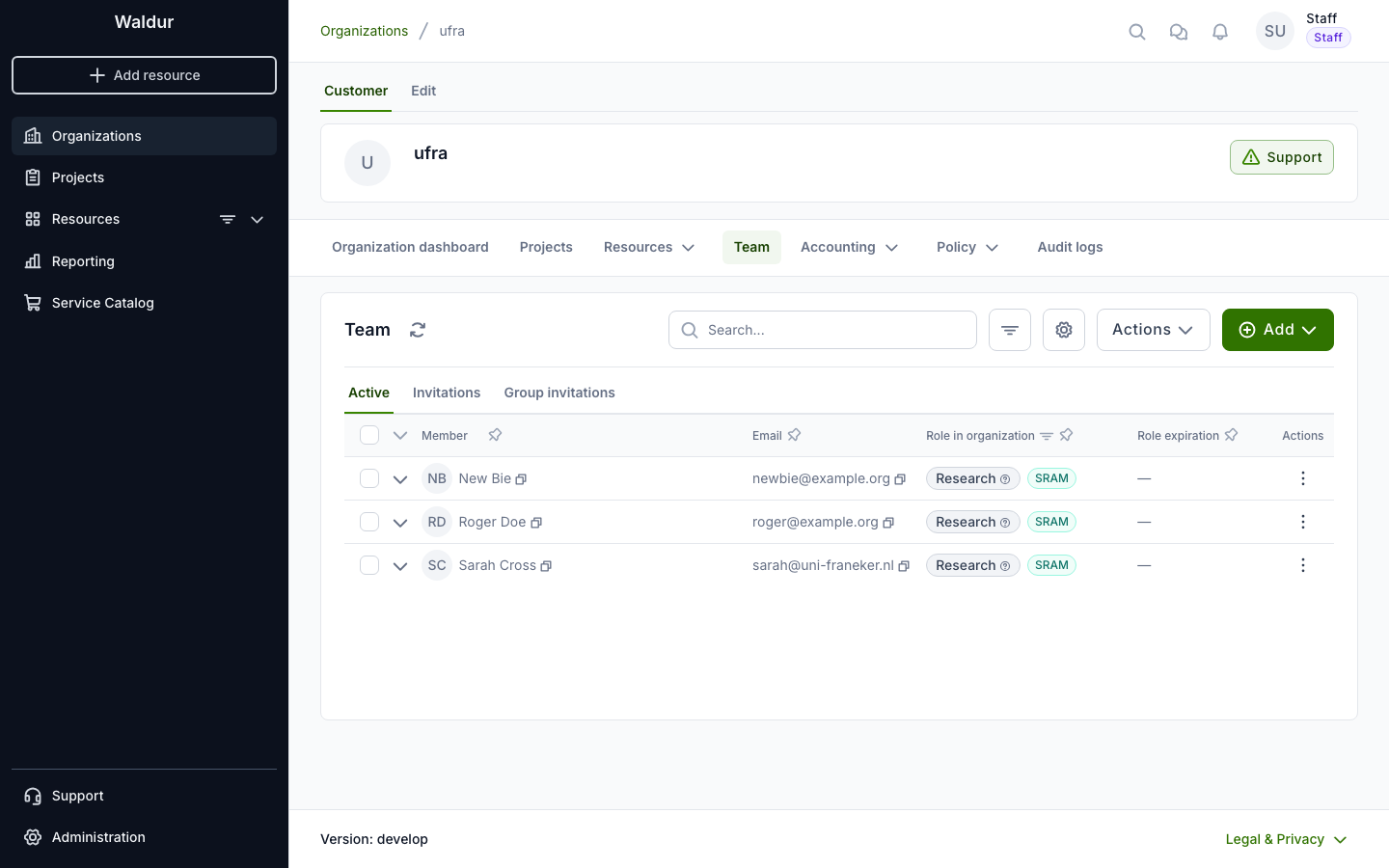
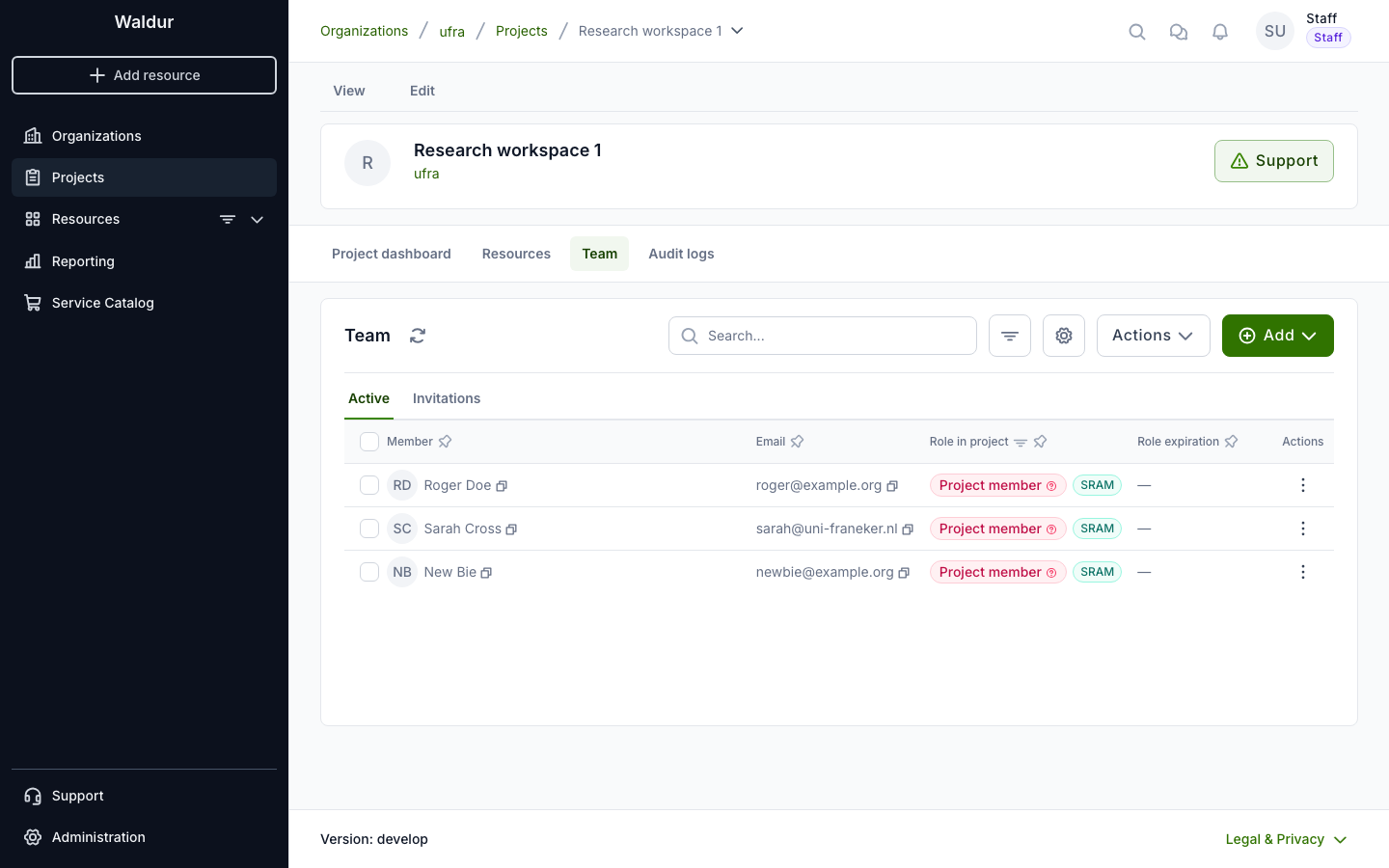
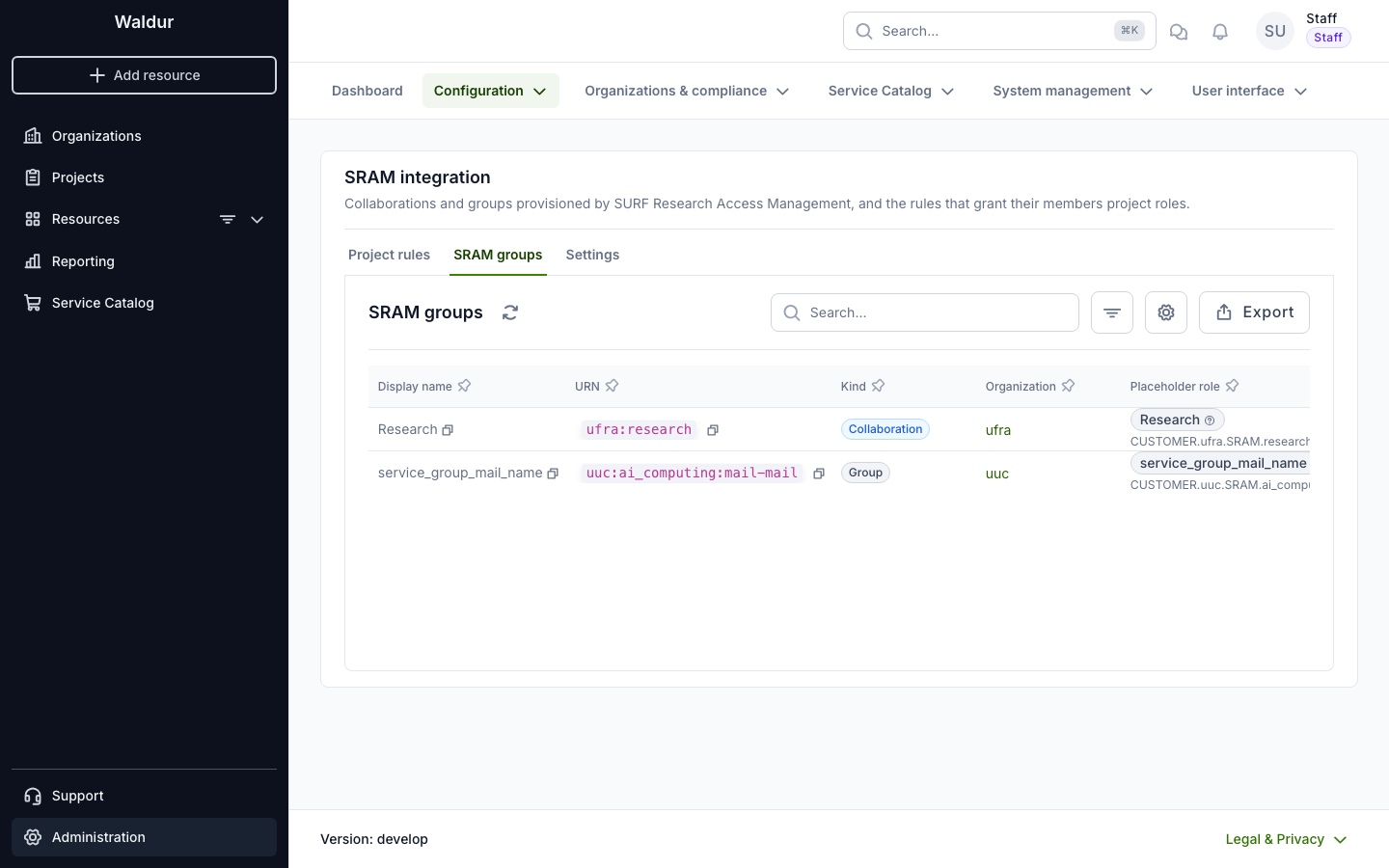
In Waldur, the collaboration's members hold its placeholder role, and a project rule gives them a role in the organization's workspaces. Both are marked SRAM:
SRAM-made grants carry UserRole.source (sram:…, sram-rule:…). Their
events are logged without email, and holders count toward the organization's
user quota. waldur sram_resync re-applies the stored SRAM data, for example
after changing the placeholder template.
Keep the team private
Listing an organization's or project's members requires CUSTOMER.VIEW_TEAM
or PROJECT.VIEW_TEAM. On upgrade, every existing organization and project
role receives it, so current users keep their team view; see
team visibility.
Placeholder roles only have it if SRAM_PLACEHOLDER_ROLE_TEMPLATE does, so
by default SRAM members cannot see who else is in the organization.
Connecting a Waldur deployment
- Make
/scim/v2/reachable from SRAM (the Helm chart and docker-compose route it) and enableSCIM_INBOUND_ENABLEDandSRAM_INTEGRATION_ENABLEDin Constance. To show the SRAM administration page and the SRAM markers in HomePort, also enable the feature SRAM integration → integration (sram.integration). See SCIM identity provider. -
Decide how SRAM users match existing accounts (
SCIM_USER_MATCH_WALDUR_ATTRIBUTE,SCIM_USER_MATCH_SCIM_ATTRIBUTE) and what placeholder roles may do (SRAM_PLACEHOLDER_ROLE_TEMPLATE) before the first push.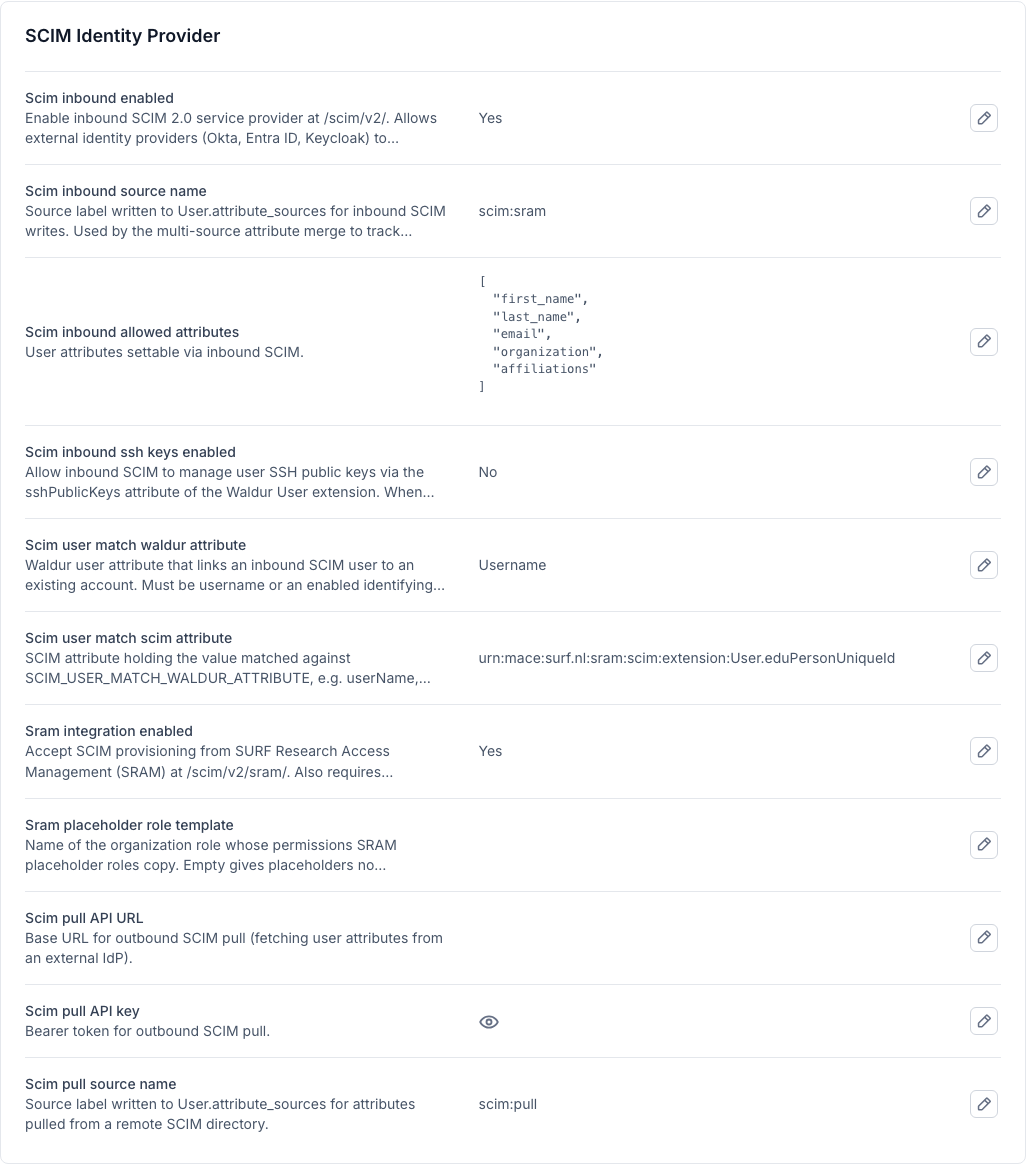
-
Create a staff service account whose token never expires, and note the token:
 1
 2
 3
 4
 5
 6
 7
 8
 9
10
from rest_framework.authtoken.models import Token from waldur_core.core.models import User svc, _ = User.objects.get_or_create(username="scim-sram-svc") svc.is_staff = True svc.is_active = True svc.set_unusable_password() svc.token_lifetime = None svc.save() print(Token.objects.get_or_create(user=svc)[0].key) -
Optionally set
SCIM_INBOUND_SOURCE_NAMEtoscim:sram, so SRAM-provided attributes are recognisable in the users' attribute sources. -
In SRAM, open the service, enable SCIM, and set the SCIM URL to
https://<waldur-host>/scim/v2/sramand the bearer token to the token from step 3. Enable the sweep: SBS does not push sub-group deletions on its own, so the sweep is what removes them.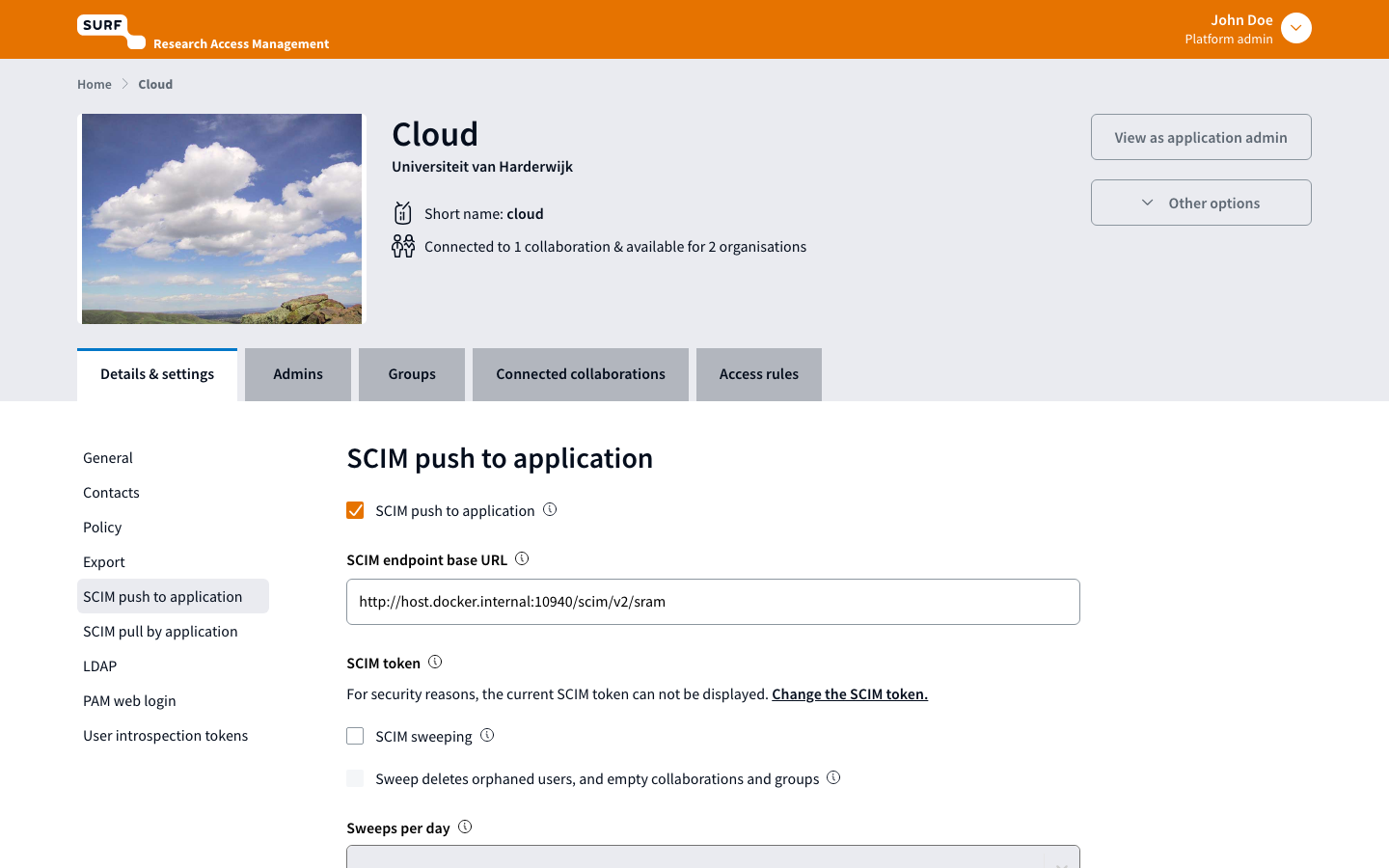
-
Connect the service to a collaboration. SRAM pushes that collaboration's members and groups right away.
- Define project rules for the projects SRAM members should reach.
Project rules in Waldur
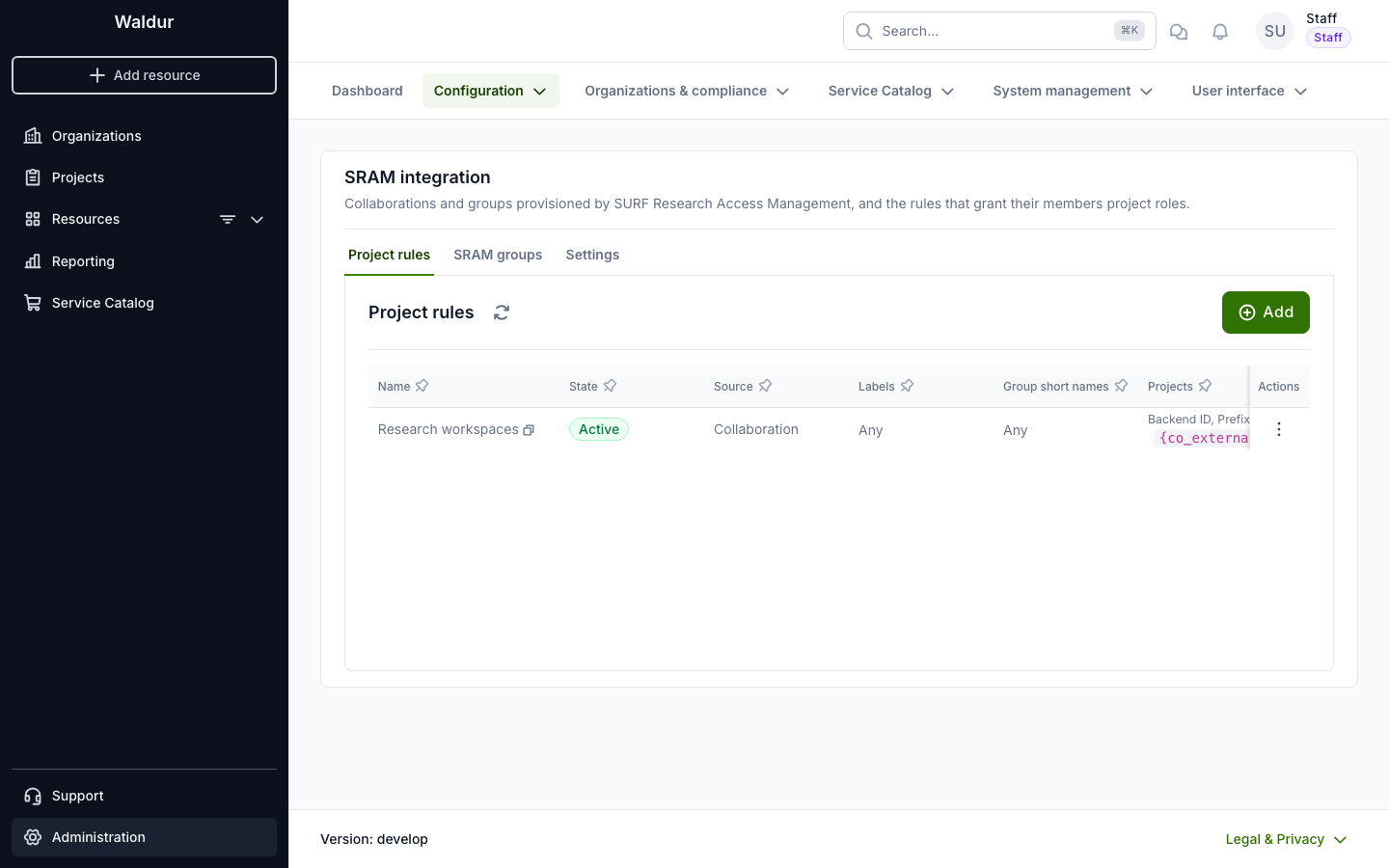
Staff manage the rules under Administration → Configuration → SRAM integration. The page also lists the collaborations and groups SRAM provisioned, with their organization and placeholder role, and summarises the SRAM settings.
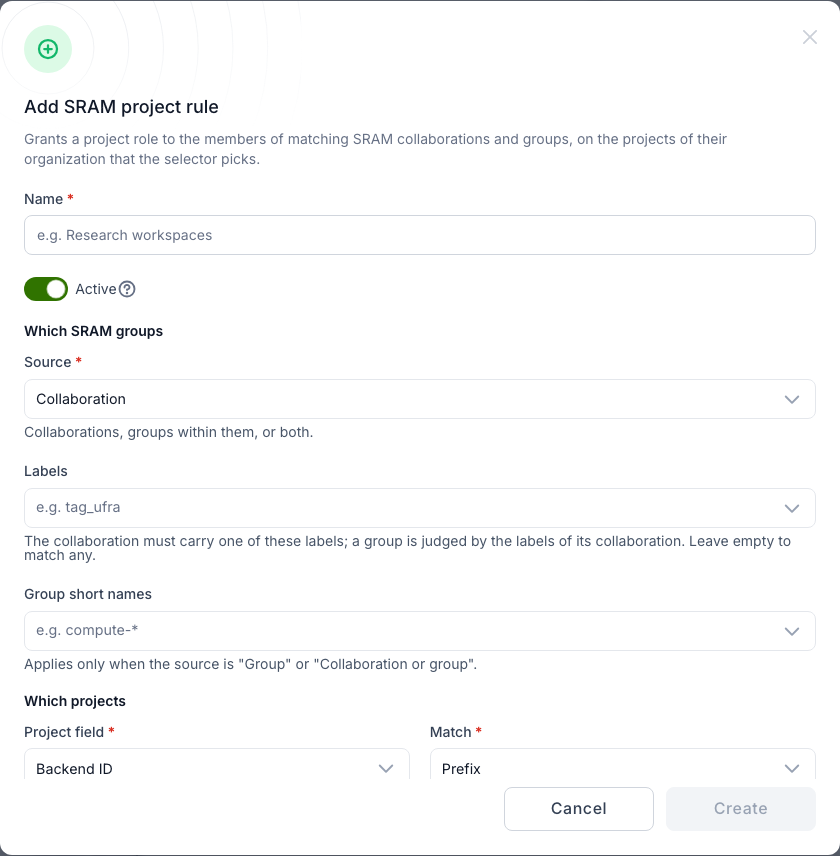
A rule picks SRAM groups (collaborations, groups or both, optionally by label and group short name) and selects projects of the group's organization by backend ID or slug. The pattern placeholders are listed under the field:
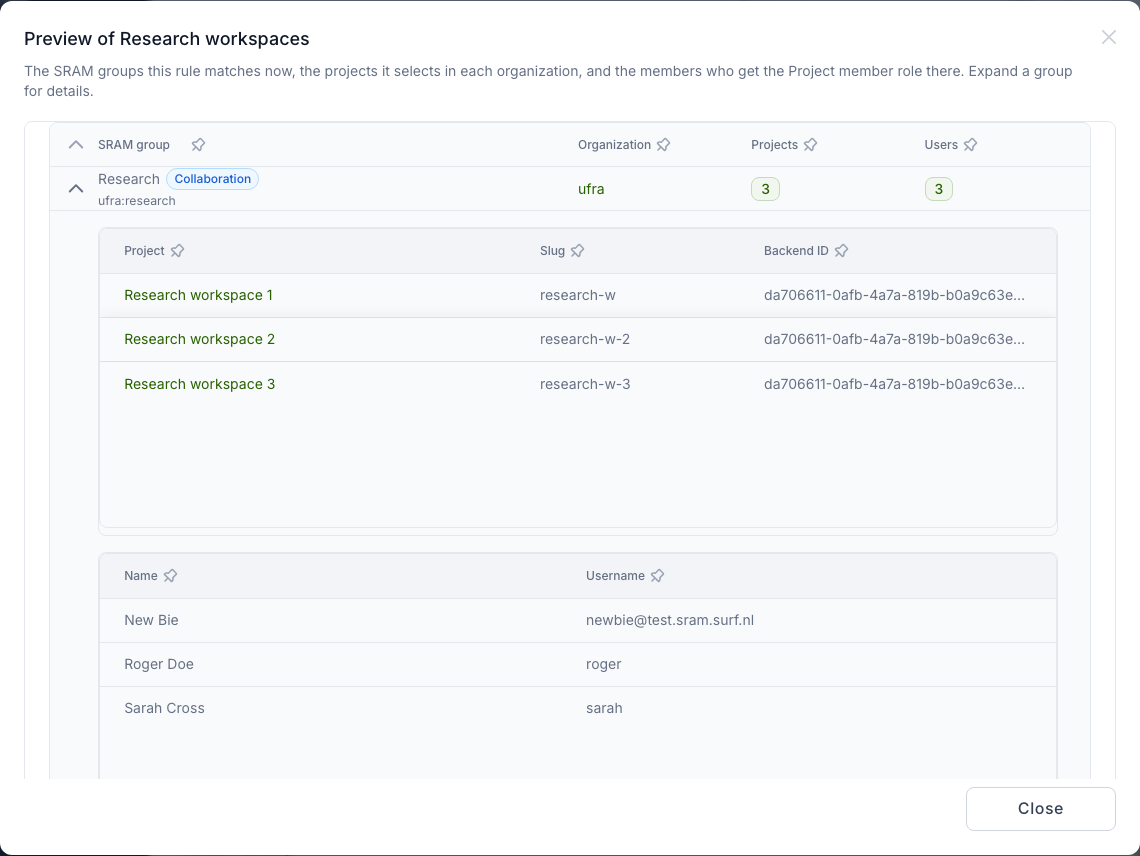
Preview shows, per matching group, the projects the rule selects and the members who get the role:
Switching the integration off
SRAM_INTEGRATION_ENABLED is the switch that matters; the sram.integration
feature only hides the user interface. While the setting is off, SRAM data is
frozen: SRAM's pushes and the SRAM APIs are refused, and nothing re-applies
placeholder roles or project rules, not even when projects or placeholder
grants change. Existing grants stay. After switching it back on, run
waldur sram_resync: it re-applies every collaboration and group and revokes
the grants of rules or groups deleted in the meantime.
Running SBS locally
SBS ships a Docker Compose stack (MariaDB, Redis, the Flask server and the Vite
client) with a mock login and seed data, so no real identity provider is
needed. The steps below were verified on Apple Silicon with Docker Desktop.
The images build natively for arm64, so the DOCKER_DEFAULT_PLATFORM=linux/amd64
from the SBS README is not needed.
1. Get SBS and prepare an override
1 2 | |
Create docker-compose.override.yml (Compose loads it automatically). It moves
the UI to port 18080, lets the server reach a Waldur backend on the host, and
runs the database migrations once before the server starts:
1 2 3 4 5 6 7 8 9 10 11 12 13 14 15 16 17 18 19 20 21 22 23 24 25 26 27 28 29 30 31 32 33 34 35 36 37 | |
Why the migrate service: the server starts eight gunicorn workers, and each
applies migrations on boot. On an empty database they race each other, fail with
Table 'alembic_version' already exists, and leave the schema half-migrated.
If that has already happened, reset with docker compose down -v (it removes
only the SBS database volume).
gunicorn 26 and the eventlet worker
If the server exits with Entry point ('gunicorn.workers', 'eventlet') not found,
the checkout pins a gunicorn release that no longer ships the eventlet
worker. Pin gunicorn==25.3.0 in server/pyproject.toml and rebuild with
docker compose build server.
2. Start and seed
1 2 3 | |
The compose file sets ALLOW_MOCK_USER_API=1, PROFILE=local and TESTING=1,
which enables the mock login and disables the CSRF check. urn:john is the
platform admin. Log in, accept the acceptable use policy, and load the seed:
1 2 3 4 5 6 7 8 9 10 11 | |
In a browser, open http://localhost:18080 and use the mock login page instead.
The seed contains several SCIM-enabled services that push to SBS's own mock
SCIM receiver (http://localhost:8080/api/scim_mock). Among them:
| Service | Connected collaboration | Sweep |
|---|---|---|
| Cloud (id 3) | research |
off |
| Storage (id 4) | research |
off |
| Network Services (id 6) | ai_computing |
on, with orphan removal |
The seed's id_scope is test.sram.surf.nl, so local externalId values end
in @test.sram.surf.nl.
3. Prepare the Waldur dev stack
The SBS server reaches the host as host.docker.internal, which the Waldur
development settings do not allow. Add a settings module next to
dev_settings.py, for example dev_settings_sram.py, and keep it out of commits:
1 2 3 | |
Start the backend with DJANGO_SETTINGS_MODULE=waldur_core.server.dev_settings_sram,
run waldur migrate, enable SCIM_INBOUND_ENABLED and SRAM_INTEGRATION_ENABLED,
and create the service account from
Connecting a Waldur deployment.
Check that the SBS container can reach Waldur with the token (replace the port
with your backend's). Request an empty page of users rather than
ServiceProviderConfig: the discovery endpoints need no token, so they cannot
tell a working token from a wrong one.
1 | |
| Status | Meaning |
|---|---|
| 200 | Reachable, token accepted, both switches on |
| 401 | Token unknown or expired: the service account's token_lifetime must be empty |
| 403 | SCIM_INBOUND_ENABLED or SRAM_INTEGRATION_ENABLED is off, or the token's user is not staff |
| 404 | Wrong path, for example a trailing slash in the base URL (…/sram//Users) |
4. Point a service at Waldur
1 2 3 | |
SBS stores the token encrypted, so set it through this endpoint or the service's SCIM settings in the UI, never directly in the database.
5. Trigger a push
Any change to the connected collaboration pushes to the service: add or remove a member, edit a group, change labels. To push everything for a service at once, run a sweep as the admin:
1 | |
The response lists what SBS created, updated and deleted. SBS logs the service's
errors as Scim endpoint … returned error <status> (docker logs sbs-server).
The Waldur side logs every request in its backend log.
What to expect
With the seeded Cloud service (collaboration research of organisation ufra,
sub-group science) pointed at a Waldur dev stack:
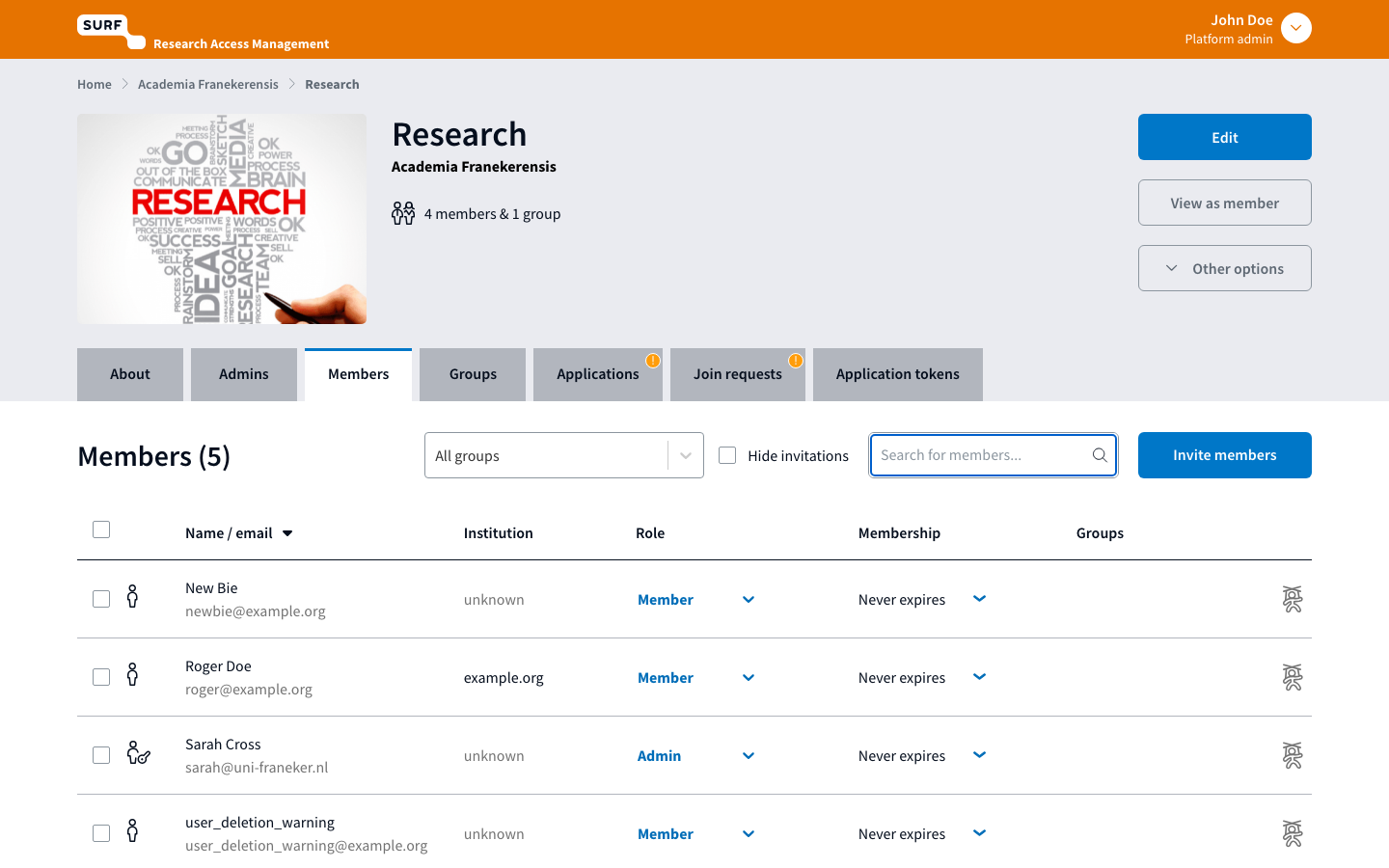
- A sweep creates the collaboration's members as users, the
ufraorganization (or adopts an existing one namedufra), and the placeholder rolesCUSTOMER.ufra.SRAM.researchandCUSTOMER.ufra.SRAM.research.science, held by the active members. A second sweep reports nothing to do. -
Create workspaces the way an external system would:
1
2
3
curl -s -X POST -H "Authorization: Token <token>" -H 'Content-Type: application/json' \ -d '{"name":"Research workspace 1","customer":"http://localhost:10780/api/customers/<ufra uuid>/","backend_id":"<research externalId>_ws1"}' \ http://localhost:10780/api/projects/ -
Add a project rule (Administration → Configuration → SRAM integration, or
POST /api/sram-project-rules/) withproject_field=backend_id,project_match=prefix,project_pattern={co_external_id}_andPROJECT.MEMBER. The members get the role on every matching workspace;GET /api/sram-project-rules/<uuid>/preview/shows who and where. - Remove a member in SBS (
DELETE /api/collaboration_memberships/<co id>/<user id>): SBS pushes the groups, and the member loses the placeholder and the workspace roles. Deleting the rule revokes all its grants.
Capturing SRAM payloads
To record exactly what SRAM sends without a Waldur backend, leave a service pointed at SBS's mock receiver. The seeded services have no SCIM token, so give the service one first, because the mock checks it:
1 2 3 4 5 | |
statistics returns every recorded call per service (method, path, query and
JSON body) plus the mock's stored resources. That makes it a good source of
realistic test fixtures. DELETE /api/scim_mock/clear resets it.
Cleaning up
1 | |
Restore the service's SCIM URL (or re-run the seed) before pointing another Waldur stack at the same SBS.
References
- SBS source, in particular
server/scim/(the SCIM client) andserver/api/scim.py(sweep and SRAM's own SCIM API) - SRAM API documentation
- SCIM identity provider